

Fellow Data Tinkerers
Today we will look at how Grab used AI agents to cut repetitive data support from hours to minutes.
But before that, I wanted to share with you what you could unlock if you share Data Tinkerer with just 1 more person.
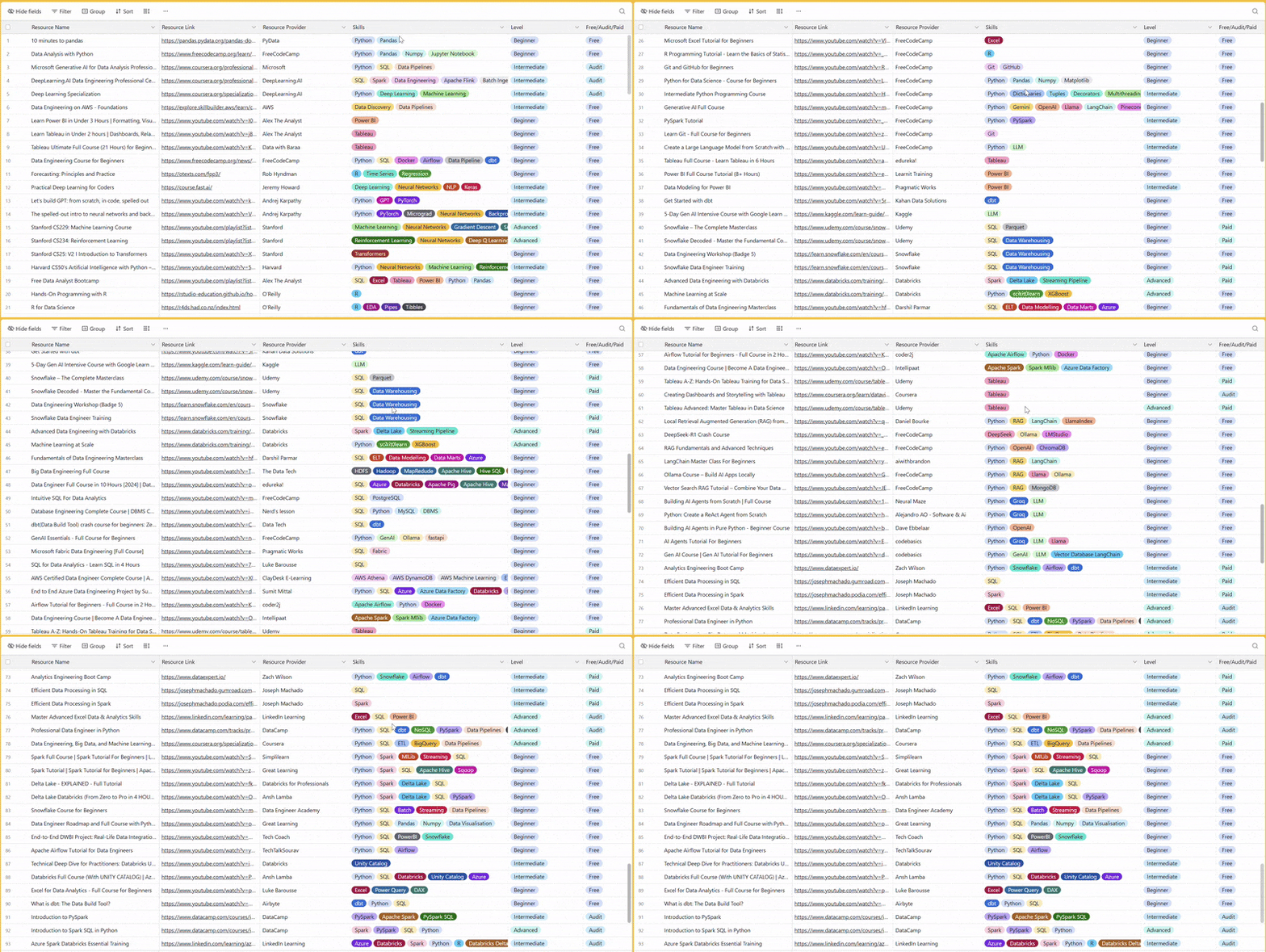
There are 100+ resources to learn all things data (science, engineering, analysis). It includes videos, courses, projects and can be filtered by tech stack (Python, SQL, Spark and etc), skill level (Beginner, Intermediate and so on) provider name or free/paid. So if you know other people who like staying up to date on all things data, please share Data Tinkerer with them!
Now, with that out of the way, let’s get into how Grab turned repetitive data support into an AI agent workflow.

TL;DR
Situation
Grab’s Analytics Data Warehouse team supported 1,000+ monthly users and 15,000+ tables, but repetitive ‘quick questions’ were consuming ~40% of engineering time.
Task
The team needed to reduce manual support work while keeping answers accurate, safe and trusted for production data workflows.
Action
Grab built a multi-agent AI system with specialised agents for data investigation, code search, on-call checks, summarisation and enhancement requests.
Result
Resolution time dropped from hours to minutes, support backlog was largely removed and several FTEs worth of engineering capacity shifted back to roadmap work.
Use Cases
Data quality validation, internal support bot, BI troubleshooting assistant, tracing data lineage
Tech Stack/Framework
FastAPI, LangGraph, Redis, PostgreSQL, tiktoken, Trino, Apache Hive, Delta Lake, Apache Spark, Apache Airflow, RAG
Explained further
Context
Grab’s Analytics Data Warehouse team supports more than 1,000 users every month. Those users rely on a repository of over 15,000 tables, which powers roughly half of all queries across Grab’s data lake.
That scale is useful, obviously. It also creates a very familiar data platform problem: the team becomes the help desk for every ‘quick question’ that is not actually quick.
Someone asks what a column means. Someone else wants to know why a table looks wrong. Another person needs help tracing where a metric came from. Then there are quality checks, source investigations, pipeline questions and basic enhancement requests.
Individually, none of these requests look dramatic. Collectively, they were eating about 40% of the team’s time. That is roughly two days every week spent on repetitive support work instead of building the next layer of the platform.
The Grab team responded by building a multi-agent AI system that could handle simpler questions autonomously and work through more complex investigations with help from specialised agents. The result was a shift from reactive support back to proactive engineering work, with hundreds of hours of productivity unlocked every month.
The Friday Slack message every data engineer fears
It is 5:00 PM on a Friday. A Slack message lands:
“The vehicle_id in our production table looks gibberish. Is the pipeline broken?”
Every data team knows this message. It might sound small but it is not.
To answer it properly, an engineer needs to check the data catalogue, inspect the table, trace the lineage, validate the SQL, look at the code, check pipeline health and maybe search through Slack or Confluence for recent incidents. By the time the stakeholder receives a confident answer, what looked like a five-minute question has quietly consumed a large chunk of engineering time.
The Grab team studied these requests and found a pattern. The problems were different, but the investigation process was often the same. The team had to gather context, check metadata, inspect data, search code, validate assumptions and summarise the answer. That consistency was the opportunity.
Rather than trying to answer every question manually, the team built a multi-agent AI system that could automate the context hunt. Engineers would still stay in the loop where needed, especially for production changes and judgment-heavy decisions. But the repetitive investigation steps could be handled by agents.
Solution
The system was designed around one simple idea: separate the reasoning layer from the action layer.
The large language model handles interpretation and planning. The agents handle specialised work such as querying data, searching code, checking incidents, reviewing pipeline health and drafting code changes. This made the system easier to reason about, easier to debug and safer to operate.
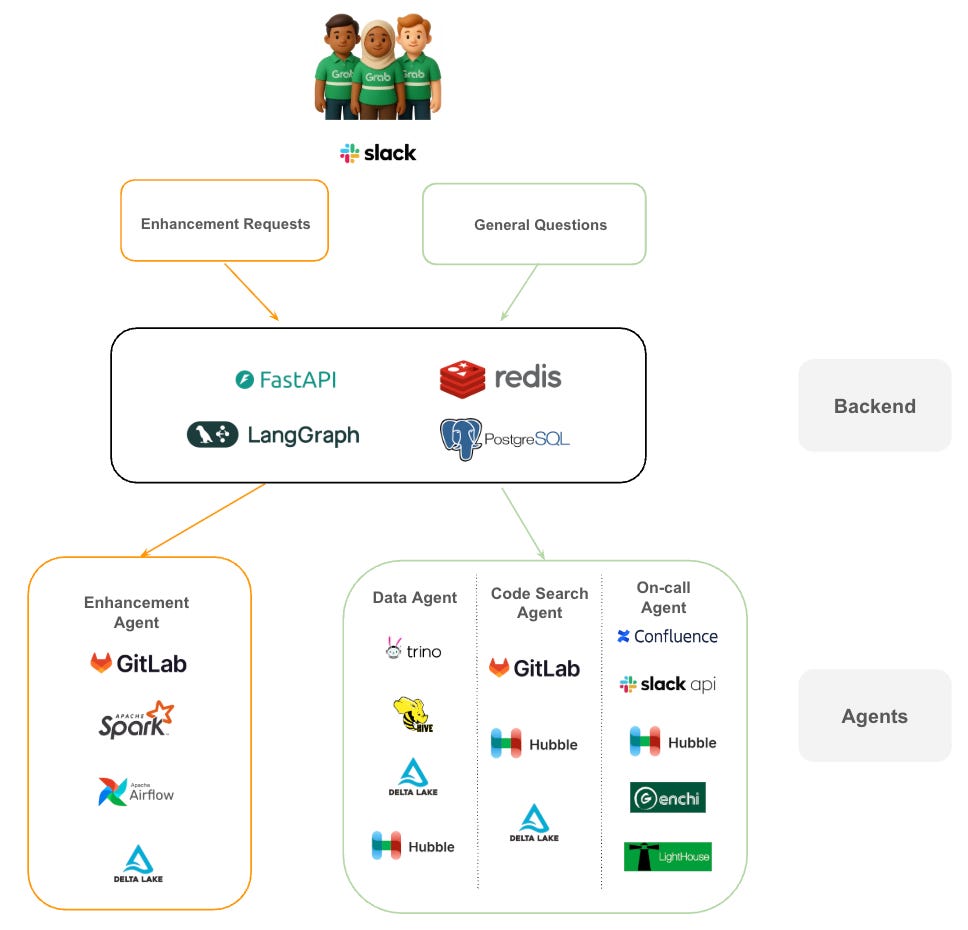
Grab used FastAPI to handle incoming requests and LangGraph to manage the agent workflows. LangGraph was important because this was not a simple one-shot LLM call. The agents needed to loop, pass work to each other, ask for more information and maintain state across a multi-step investigation.
Redis was used for caching and real-time session needs. PostgreSQL served as persistent memory, storing conversation history and agent metadata.
The system also connected into Grab’s internal platforms:
Hubble, the central metadata management platform and data catalogue.
Genchi, the data quality observability platform used to enforce data contracts.
Lighthouse, the platform used to track execution status and monitor pipeline health.
How a Slack question turns into an agent workflow
The journey starts in Slack. When a user sends a request, the system routes it into one of two broad streams.
The first stream is for enhancement requests. These go to the Enhancement Agent, which works with engineering tools such as GitLab, Apache Spark and Airflow to propose and test code changes.
The second stream is for general questions. These go through the investigation pathway, where the system coordinates a small group of specialist agents. The Data Agent queries systems such as Trino, Hive or Delta Lake. The Code Search Agent inspects GitLab. The On-call Agent checks operational context from Confluence, Slack and observability tools.
This design matters because the system is not one giant agent trying to do everything. The ‘brain’ is decoupled from the ‘hands’. The LLM can reason about the request, but the actual work is handled by tools and agents with specific responsibilities.
Why one giant agent was the wrong answer
Grab could have built one large agent and asked it to handle every type of request. That would have been simpler at first glance: one model, one prompt, one inference path.
But that kind of monolithic design becomes hard to maintain as the system grows. Every new tool increases prompt complexity. Every change risks affecting unrelated behaviour. Debugging becomes messy because it is hard to know whether the failure came from classification, data access, code search, reasoning or summarisation.
The multi-agent design traded some latency and coordination complexity for maintainability and accuracy.
A single AI system has the advantage of being simpler to call and manage. But it is also harder to debug, harder to improve safely and more likely to behave like a generalist.
A multi-agent system is more modular. Each agent can be improved independently. The Data Agent can get better at query validation without touching the Code Search Agent. The On-call Agent can be expanded with better incident lookup without changing the Enhancement Agent. Failures are easier to isolate because each part has a narrower job.
For Grab, the choice was obvious. When replacing a manual process that used to take hours, a few minutes of agent coordination is not a serious downside. Accuracy and maintainability mattered more than shaving off a few seconds.
The two-lane system behind Grab’s agent workflow
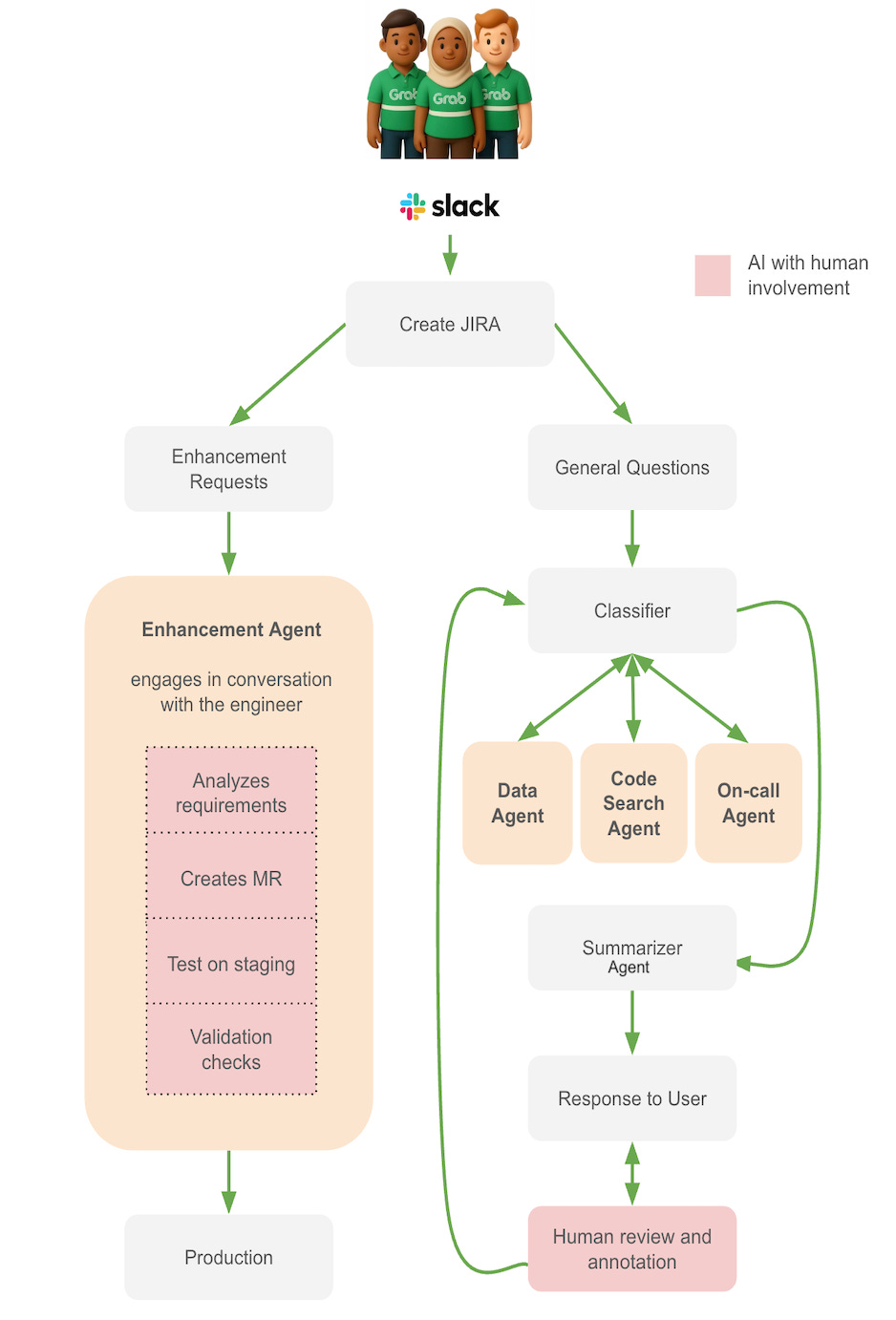
When a question arrives through Slack, the system first decides which pathway it belongs to.
Pathway 1: Enhancement requests go to the Enhancement Agent.
Pathway 2: Investigation questions go through the Classifier, then one or more specialist agents, then the Summarizer.
The agent that drafts pipeline changes but does not ship them blindly
Some requests are not just questions. They require changes to data pipelines.
For example:
“Can you add a new column for customer_segment?”
Or:
“We need to change the aggregation logic for revenue.”
Previously, this meant an engineer had to gather requirements, inspect schemas, find the right code, check dependencies, write changes, test them and prepare a merge request.
The Enhancement Agent handles much of that heavy lifting.
It gathers context from schemas, lineage, dependencies and the existing codebase. It proposes code changes and creates a merge request. It runs the changes in a test environment. It also flags governance concerns such as PII classification, SLA impact and backward compatibility.
The workflow is intentionally semi-automated.
A user creates a JIRA request. The agent analyses the requirements and gathers extra context through dialogue with the engineer. It creates a Merge Request (MR) with suggested code. The engineer reviews the MR. If the changes are valid, the agent runs them in a test environment. The engineer checks the output against test cases. If everything passes, the engineer merges the MR.
That final approval stays with a human because production pipeline changes need judgment. The agent can do research, write code and run tests, but it should not be blindly changing production systems.
The agent squad for messy data questions
For questions such as “Why does this data look wrong?” or “Where does this metric come from?”, the system uses a coordinated investigation flow.
The Classifier is the first responder. It parses the question, extracts important details such as tables, scripts or columns, detects guardrail violations and decides which specialist agents are needed. It also provides the reasoning and task description for each agent.
For a question like “Why does this ID look wrong?”, the Classifier may route the request to the Data Agent, then the Code Search Agent, then the On-call Agent if production context is needed.
The Data Agent performs the data investigation. It enriches the prompt with table and column metadata, runs SQL queries with guardrails, validates schemas before scanning and retrieves sample data with exploratory comments. This helps confirm whether the user’s observation is real or based on a misunderstanding.
The Code Search Agent inspects the codebase. It traces transformations, follows table lineage across multiple steps and explains transformation logic in plain language. It can also highlight differences between the implementation and what documentation or stakeholders expect.
The On-call Agent checks production context. It searches Slack for outage announcements, checks observability platforms for pipeline status, reviews logs and retry policies, validates quality metrics such as null counts and duplicates, and produces initial incident notes when something looks wrong.
The Summarizer Agent pulls the pieces together. It handles conflicts, turns agent findings into a coherent answer and makes the response concise enough for Slack. It is the final step before the answer is reviewed or posted.
What this looks like in real data team workflows
The clearest way to understand the system is to walk through two common scenarios.
Scenario 1: Adding a new column
A stakeholder creates a JIRA ticket:
“Please add a customer_segment column to the rides table. Source data is available in the user_profiles table.”
In the traditional workflow, this would take a decent chunk of an engineer’s afternoon. There would be requirement checks, code discovery, schema validation, development, testing and MR preparation.
With the Enhancement Agent, the process becomes much faster.
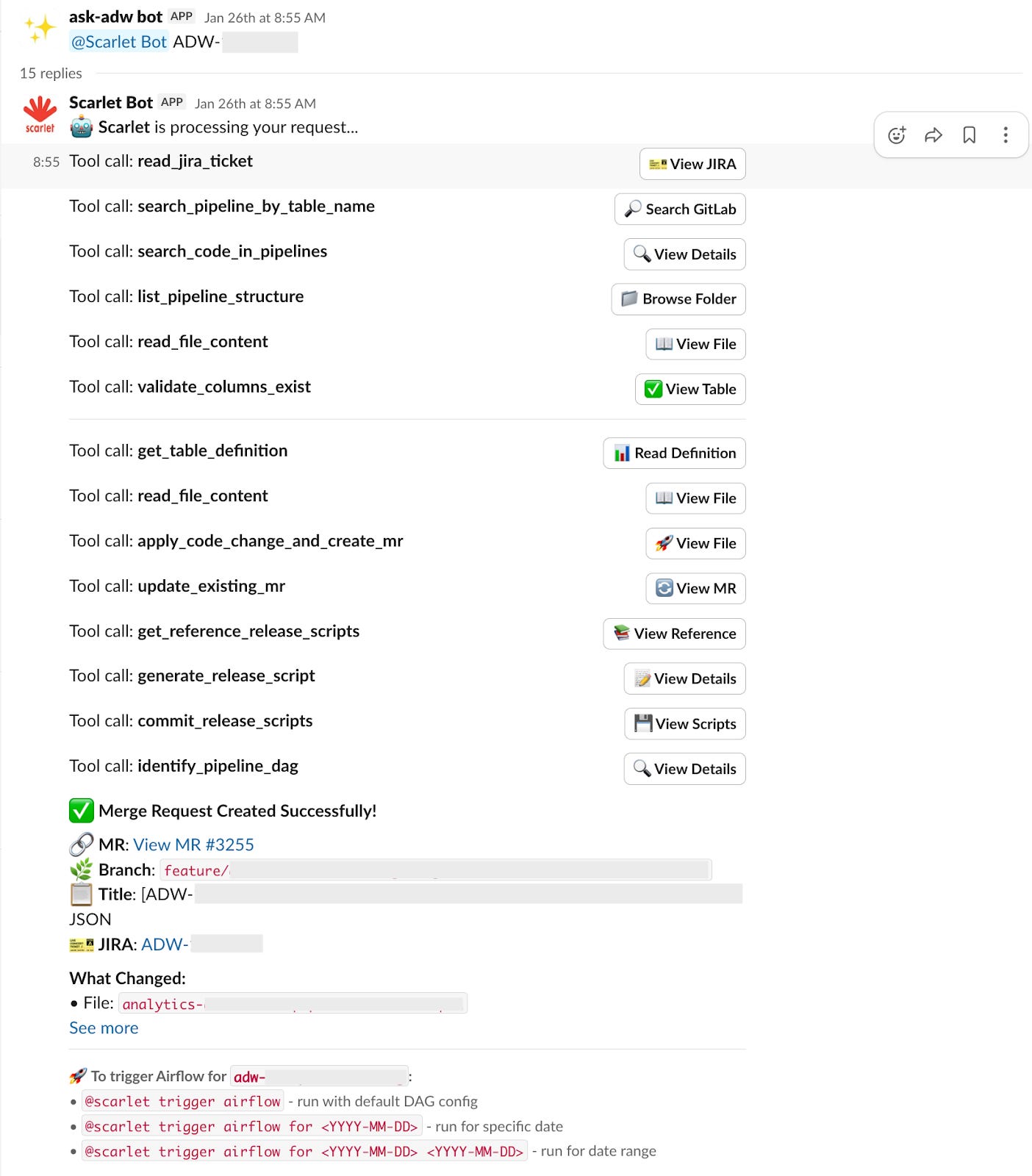
The agent first reads the JIRA ticket to understand what column needs to be added, which target table is involved and where the source data lives.
Then it searches the codebase to find the relevant transformation files. It navigates the repository, identifies the right scripts and locates the parts that need modification.
Before making changes, it validates that the requested column exists in the upstream source table, checks that the column does not already exist in the target table, and confirms schema compatibility and data quality requirements.
It then generates the database schema changes. To do that, it references existing Data Definition Language (DDL) scripts, follows the standard format and creates the required schema modification scripts. These are included in the MR alongside the code changes.
Finally, it creates the MR with documentation. Once the MR is validated, users can interact with the bot to trigger Airflow test runs. They can also specify date ranges or parameters for testing.
The process from ticket to deployable MR is completed in minutes, but the engineer can still inspect the changes before anything moves forward.
Scenario 2: Investigating faulty-looking data
A user asks:
“Why is the ID in the vehicles table unreadable?”
In the old process, an engineer would manually search the catalogue, inspect lineage, write SQL, check logs and review pipeline status.
With agents, the investigation is broken into steps.
First, the Classifier parses the question and decides that all three specialist agents are needed. It plans the sequence as Data Agent, then Code Search Agent, then On-call Agent. Its reasoning is simple: the system needs to verify the data format, trace the transformation logic and check whether there are any production incidents.
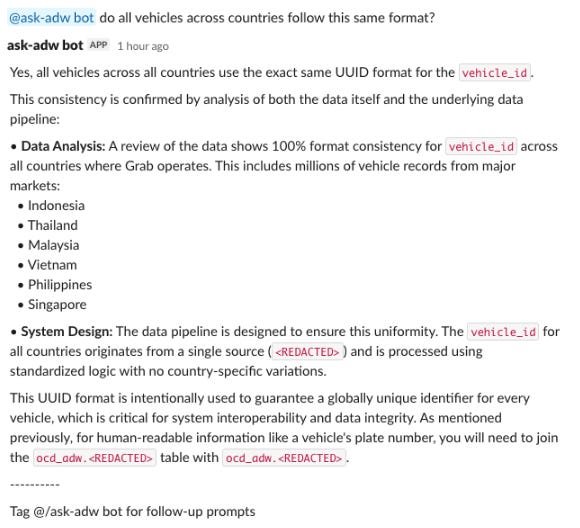
The Data Agent starts by retrieving metadata and building a SQL query to inspect sample values. It confirms the user’s observation: the IDs do look unreadable, because they are in UUID format.
It then searches Grab’s data catalogue for dimension tables that could make the values more readable. It finds a suitable dimension table and builds a join query to test whether the UUIDs can be mapped to human-readable vehicle names.
The Data Agent’s conclusion is that the ID column contains valid UUID values. They can be joined with dim_vehicles to get readable vehicle names. The data is not corrupted.
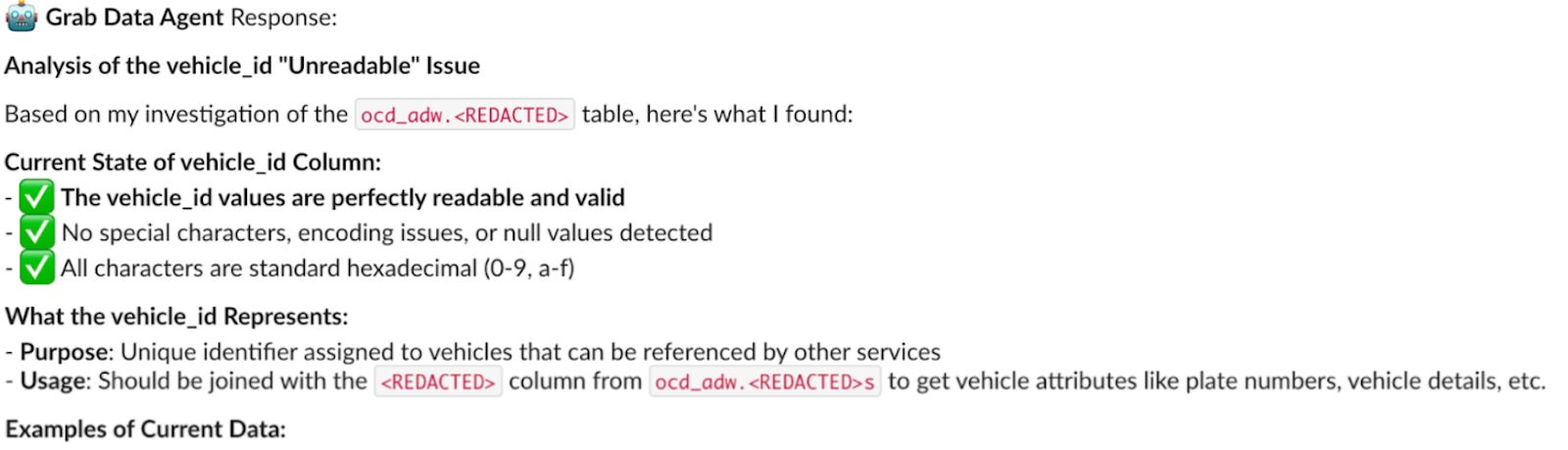
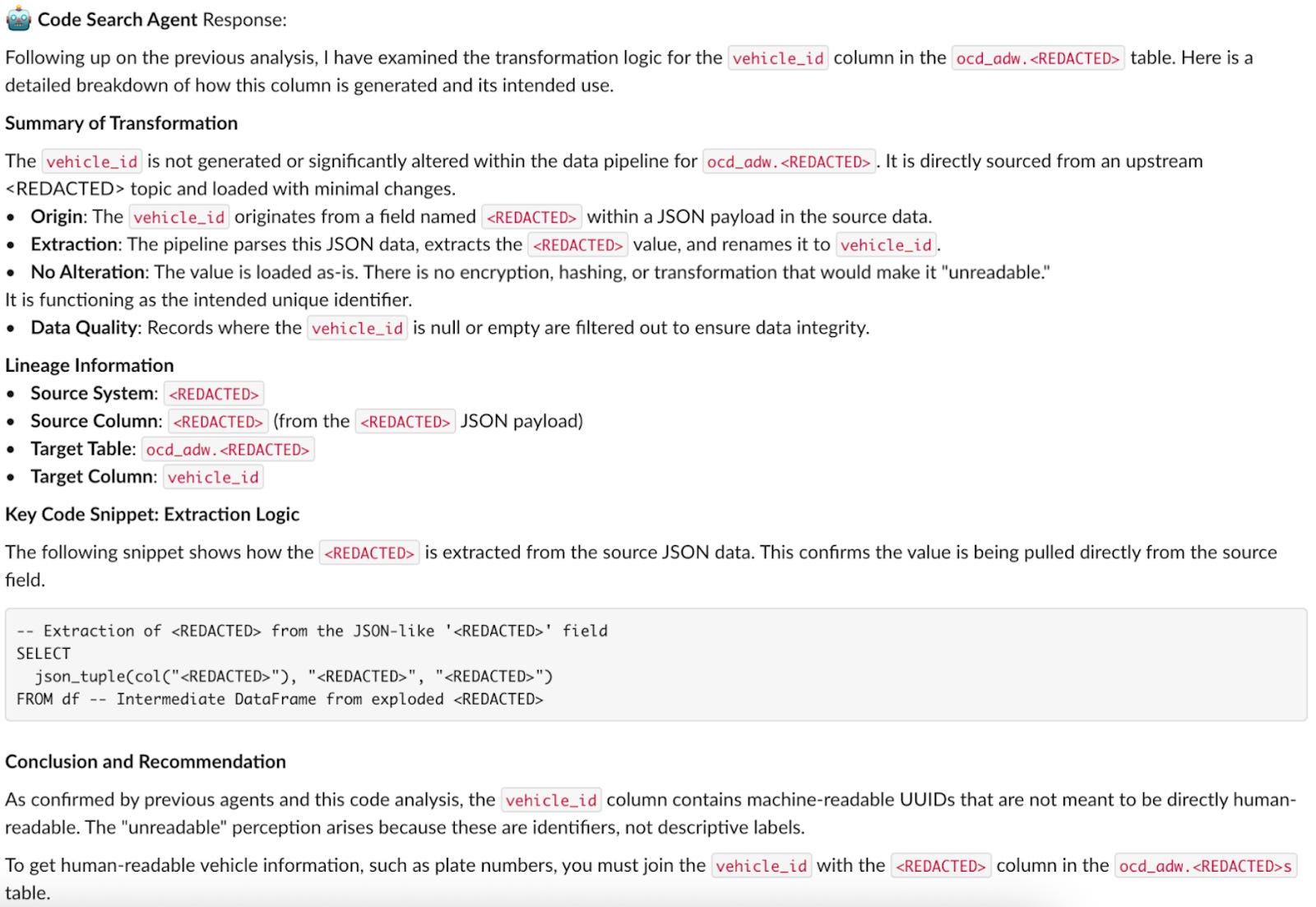
Next, the Code Search Agent traces the lineage. It scans transformation logic in the codebase and finds that the ID is extracted as a raw UUID from a JSON payload from the source system. It queries source samples and confirms that the same pattern exists upstream.
Its conclusion is that the UUID format comes directly from the source system. It is not a bug introduced by Spark transformations.
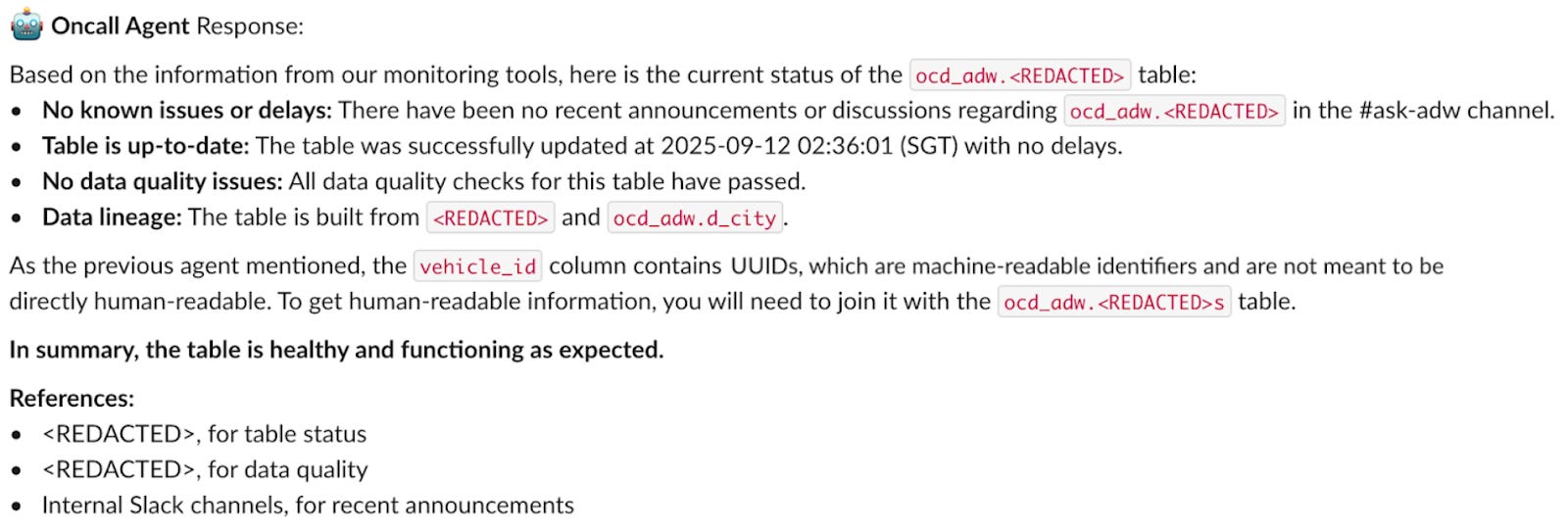
Then the On-call Agent checks operational health. It reviews Airflow pipeline status, searches Slack for incidents and checks data quality metrics.
Its conclusion is that no production incident is detected. The pipeline is running successfully, quality metrics are normal and no recent complaints have been raised in communication channels.
The Summarizer Agent then turns these findings into a structured answer.
The user’s concern was that ID values looked unreadable. The Data Agent found that the IDs are valid UUIDs and can be joined with dim_vehicles for readable names. The Code Search Agent found that the UUIDs come directly from the source system. The On-call Agent found no production issue.
So the answer is clear: the data looks unfriendly, but it is valid. The pipeline is not broken.
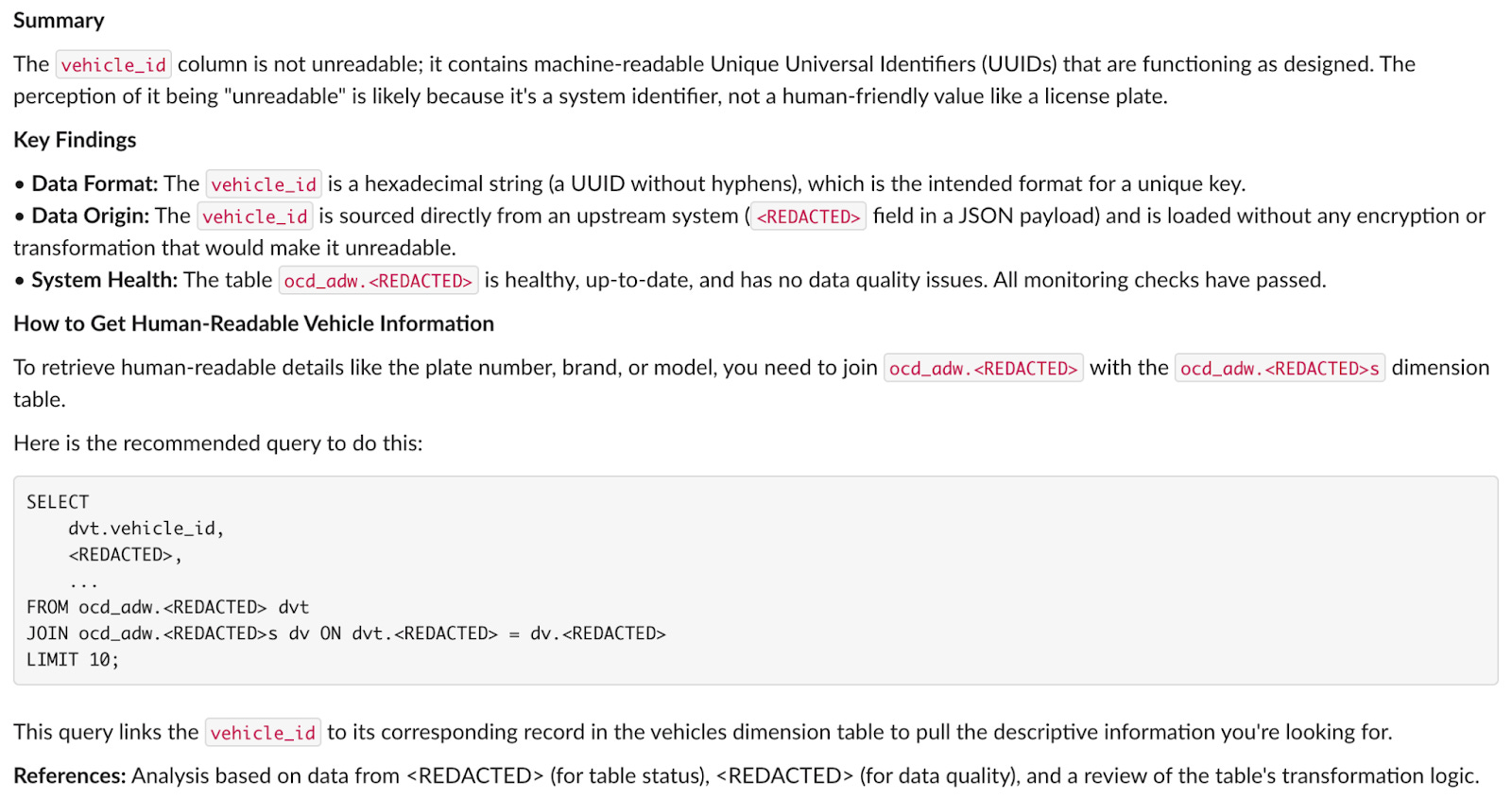
The answer is posted to Slack quickly and marked as unreviewed. This gives users a fast initial response while making it clear that an engineer still needs to review it. The initial response time drops from hours to minutes.
After the answer is posted, anyone can continue the conversation with the agents, which restarts the loop when more clarification is needed.
What Grab had to fix before this worked in production
The prototype worked but making it work in production was harder.
Real users ask messy questions. Conversations get long. Agents use too many tools. Tool outputs can be huge. Some queries are risky. And because this system touches production data workflows, trust matters.
Grab had to optimise the architecture around six major challenges.
The agents were drowning in their own context
In multi-agent systems, context grows quickly. Each agent adds messages, tool calls, results and reasoning. If that context is passed forward without discipline, token usage balloons and performance drops.
Grab’s orchestrator maintains a rich execution state, including conversation and tooling history, agent progress and structured responses from each agent. But that state is managed carefully so agents receive the context they need without being flooded.
The system tracks tokens using tiktoken. When limits are exceeded, earlier messages are summarised while preserving information relevant to the original question. Recent messages and critical context remain unsummarised to protect accuracy.
The team also pruned RAG context. Instead of passing entire code files to the Code Search Agent, smaller LLMs extract the most relevant snippets and short descriptions. For database queries, filters are used to retrieve only the most relevant results.
The handoff pattern is also important. Each agent returns its response to a central orchestrator. The orchestrator cleans the context, removes unnecessary tokens and invokes the next agent.
The result is a system that can handle extended investigations without drowning in its own context.
Too many tools made the system slower, not smarter
The early version had more than 30 tools, many shaped like generic APIs. That created another problem: tool descriptions and outputs became part of the agent prompt, so the model had to process a lot of irrelevant material before doing useful work.
Grab redesigned tools around real usage. Tool descriptions were shortened. Outputs were aggressively trimmed. Only information needed for decision-making was included.
This reduced the amount of data agents had to process and improved responsiveness.
Adding guardrails around SQL and code changes
Agents with database access and code generation powers are useful, but also risky.
They could access sensitive PII, run expensive queries, execute dangerous SQL or generate breaking changes. Grab added multiple layers of safety.
First, the Classifier checks for PII requests and out-of-scope questions before any agent runs.
Second, the Data Agent validates SQL before execution. It checks PII column access, blocks risky DDL and DML operations, detects slow queries and validates schemas before running anything.
Third, all database queries have strict timeout limits.
Fourth, the Enhancement Agent cannot commit directly to master or main. All changes go through merge requests, require human review and run in a test environment first.
The point is not to pretend agents are perfectly safe. The point is to build the system assuming they are not.
Designing review into the system
Even with RAG and guardrails, agents can be wrong. A confident wrong answer is worse than no answer, especially in a data platform context.
Grab added human review after the summarised response is generated. Reviewers can approve, reject, refine, re-route to a specific sub-agent or annotate the response.
Approval posts the response with a note that it has been checked. Rejection prevents bad information from reaching users and logs the failure. Refinement lets reviewers add guidance and regenerate the answer. Re-routing sends the question back to a specific agent with more context. Annotation stores structured feedback for future improvement.
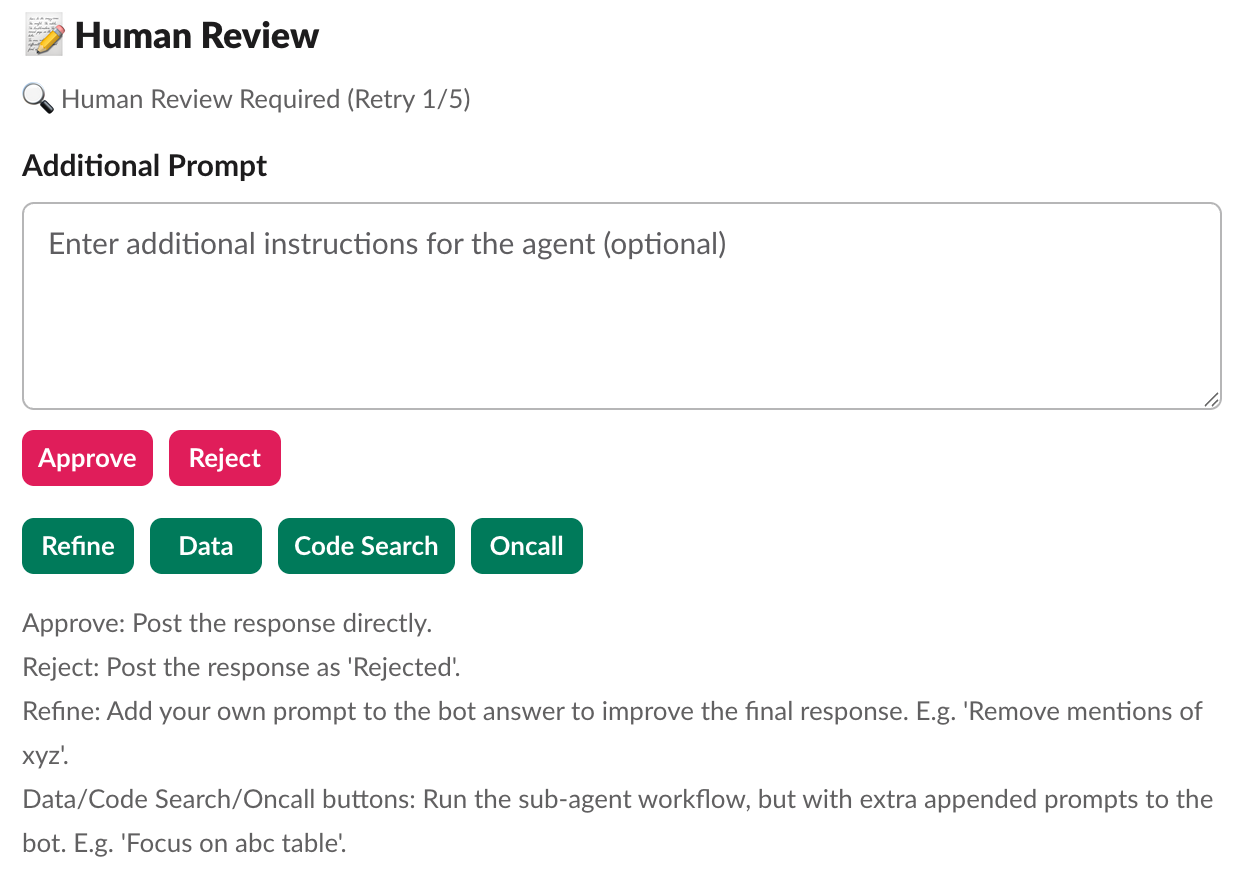
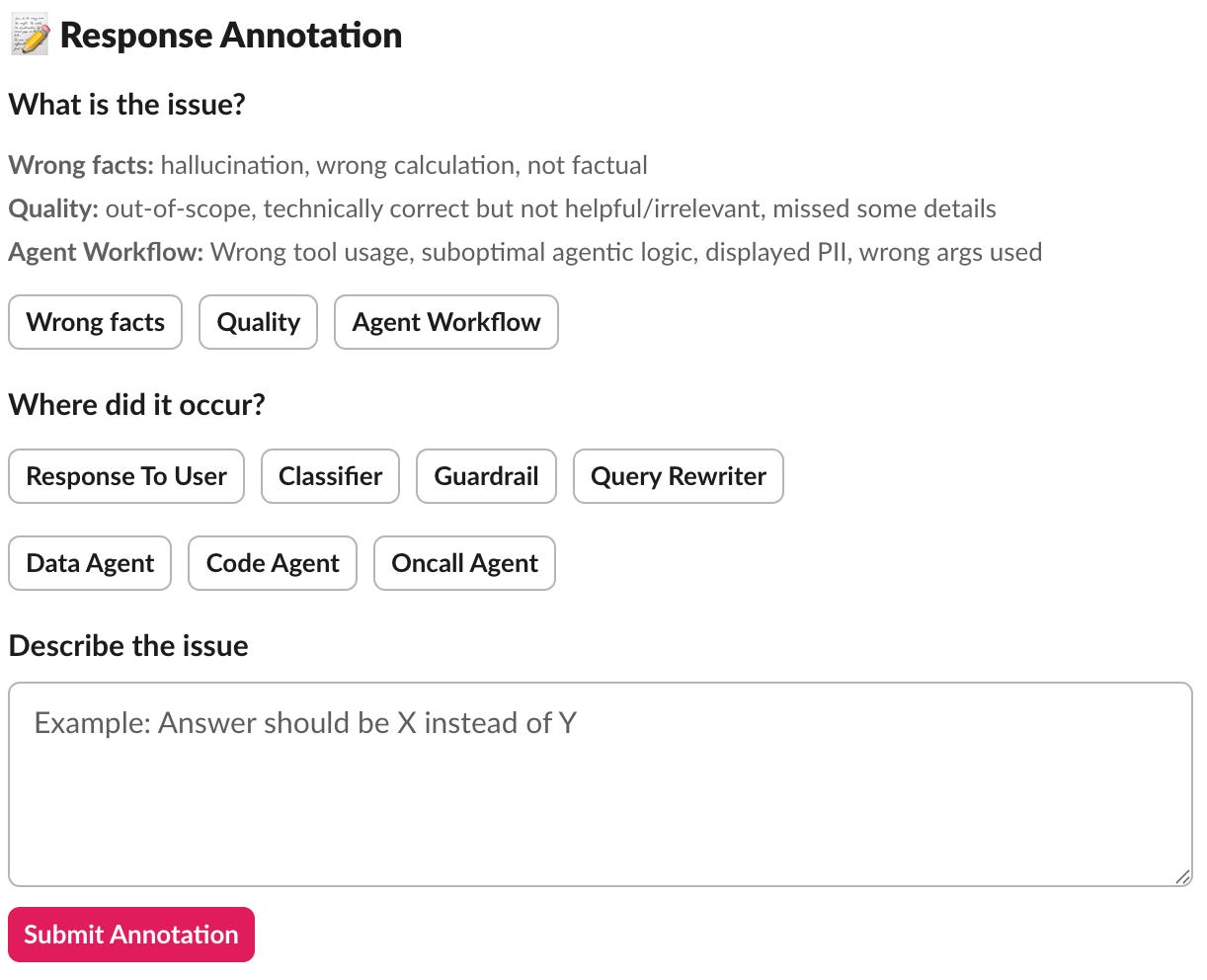
This review loop helped build trust while also creating a feedback dataset for improving the system.
Letting users move fast without hiding uncertainty
The initial design held back AI-generated answers until an engineer approved them. That was safe, but it created a bottleneck. During busy periods, users could still wait too long.
Grab changed the process. Responses can now be posted immediately, but they are clearly marked as unreviewed. Engineers can still review and modify them afterwards.
This gives users fast answers while setting the right expectation. It also keeps the feedback loop intact.
Turning annotations into system improvements
Collecting annotations is useful only if the team learns from them.
Grab turned annotations into an improvement engine. Random annotations are pulled into offline evaluations, so the system is tested against real failure cases rather than only synthetic examples.
The team analyses patterns to see whether the Classifier is routing incorrectly, whether a specific agent has quality issues, whether certain query types cause hallucinations or whether particular table schemas confuse the system.
Quality metrics track annotation rates over time. A sudden rise in rejection rates signals that something needs investigation.
Annotations then guide targeted improvements: better prompts, stronger guardrails, enhanced agents, better few-shot examples, fine-tuning opportunities and regression test suites built from real failures.
The operational impact: faster resolution and more engineering capacity
The multi-agent system changed the team’s operating model.
The bots now autonomously handle most standard user inquiries and a meaningful portion of common enhancement requests. Simple questions that previously required manual investigation can now be answered within minutes.
The resolution time dropped by an order of magnitude. The support backlog was effectively removed. More importantly, the team reclaimed several FTEs worth of engineering capacity.
That capacity shifted from reactive support into proactive roadmap delivery.
This is the real win. The team did not just make support faster. It changed what engineers could spend their time on. Instead of tracing the same definitions, checking the same logs and answering the same data questions, they could return to higher-value platform work. And downstream users got faster answers.
Three principles for applying AI agents in data teams
Grab’s move from manual firefighting to AI-assisted operations came down to three principles.
Multi-agent architecture: Specialists over generalists
Specialised agents worked better than one generalist system because each agent had a narrower job. The Data Agent could focus on SQL and metadata. The Code Search Agent could focus on transformation logic. The On-call Agent could focus on incidents and pipeline health. The Enhancement Agent could focus on code changes.
This made the system easier to maintain, easier to improve and easier to debug.
Strategic human oversight: Building trust through transparency
Human review was not treated as an afterthought. It was part of the product design.
The system could generate fast answers, but reviewers could approve, reject, refine, re-route or annotate them. That created a trust layer for users and a learning loop for the engineering team.
The “unreviewed” label also mattered. It let users benefit from speed without pretending the AI response had the same authority as a checked engineering answer.
Focus on augmentation: Automating repetitive tasks
The agents were not built to replace engineers. They were built to take over the repetitive parts of the work: gathering context, running safe queries, checking logs, tracing code and preparing first-pass answers.
That left humans to focus on the work that actually needs human judgment: architecture, prioritisation, production approvals and building new capabilities.
For Grab’s Analytics Data Warehouse team, that was the shift. Less time spent answering the same operational questions. More time spent building the platform users depend on.
The full scoop
To learn more about this, check Grab's Engineering Blog post on this topic
If you are already subscribed and enjoyed the article, please give it a like and/or share it others, really appreciate it 🙏
Keep learning
How Airtable Saved Millions by Cutting Archive Storage Costs by 100x

Airtable moved petabytes of archive data out of MySQL, made storage 100x cheaper and kept interactive query latency intact.
To get there, the team built a two-tier storage system that pushed old audit-log data into S3-backed Parquet files and queried them through an embedded Rust engine.
This piece breaks down how Airtable handled the migration, why it chose DataFusion and the optimizations that made cold storage feel fast.
How Notion Scaled AI Q&A to Millions of Workspaces

Notion scaled AI Q&A to millions of workspaces while increasing onboarding throughput 600x and cutting costs by up to 90%.
Under the hood, that meant rethinking everything from sharding and indexing to embeddings generation, moving from a dual Spark + API setup to a simpler, unified pipeline.
This piece breaks down how they handled multi-tenant vector search at scale, avoided unnecessary recomputation and rebuilt their search stack to be faster and easier to operate.
The part worth stealing here is not the agent topology, it is where the reclaimed hours went. Support deflection is real, and it moves work rather than removing it: fewer interruptions for engineers, more answers in circulation that nobody verified. Faros AI's data across 22,000 developers and 4,000 teams shows the same shape in code, with throughput per developer up 33.7% while median review time rose 441.5%. For a data support agent the equivalent of review is whether the answer reconciles against the source table. That check is cheap to automate and almost never built, because it does not appear in the hours-saved number. If Grab is running assertions behind the agent's answers, that is the transferable lesson. If it is not, the support queue did not shrink, it just moved downstream to whoever finds the wrong figure in a board pack.