

Fellow Data Tinkerers!
An account manager preparing for a renewal wants to know whether more people at a customer company are using AI. Suppose 8 people used it in one workspace and 6 used it in another, with two people in both. Adding the workspace counts gives 14. The account has 12 distinct users. Either number can come from SQL without running into an error.
To answer these types of questions, Notion has built an internal agent called Data Scout. Employees ask in plain language, the agent queries governed data in Snowflake and uses company knowledge in Notion to interpret the answer. Within two months, weekly requests to its data team fell by about 80%. Roughly half of its employees now use Data Scout.
Now before we dive into it, just wanted to say referring 1 person to Data Tinkerer gives you access to a library of data resources:
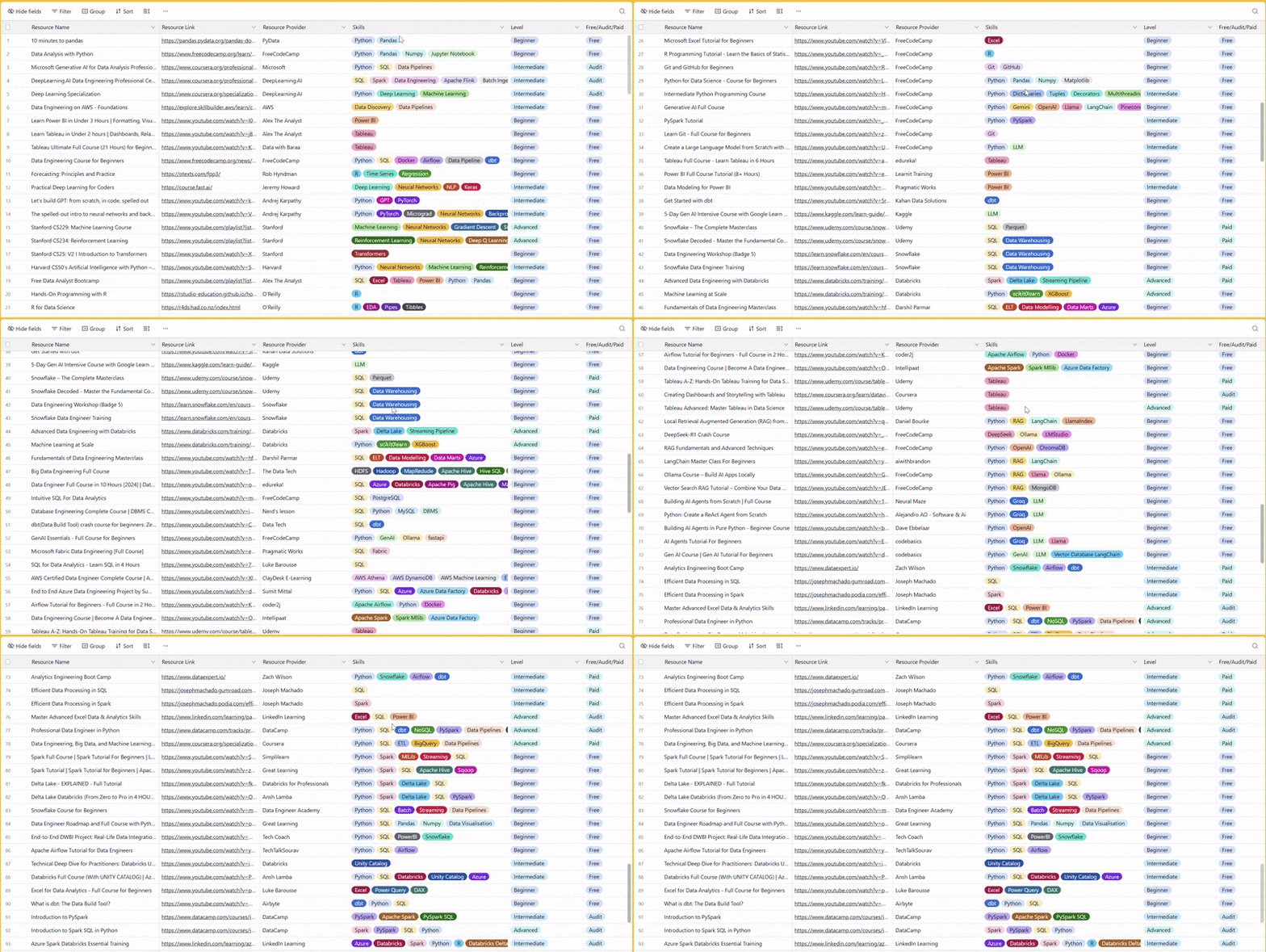
There are 100+ resources to learn all things data (science, engineering, analysis). It includes videos, courses, projects and can be filtered by tech stack (Python, SQL, Spark and etc), skill level (Beginner, Intermediate and so on) provider name or free/paid. So if you know other people who like staying up to date on all things data, please share Data Tinkerer with them!
Now, with that out of the way, let’s get into how Notion created its own AI analyst.

TL;DR
Situation
Routine questions could spend days in the data team’s Slack queue.
Task
Let employees investigate approved data themselves while preserving their Snowflake permissions and making the agent’s choice of metric, source and interpretation reviewable.
Action
Notion connected Data Scout to Snowflake under each employee’s identity, indexed approved guidance and added query tracing and nightly review.
Result
Notion reports about 80% fewer weekly requests to the data team after two months, questions answered in minutes rather than waiting days and used by about half of employees.
Use Cases
Data quality validation, internal support bot, automated BI reporting
Tech Stack/Framework
Snowflake, SQL, Slack, GitHub
Explained further
One question, several kinds of evidence
Notion sampled 200 real questions and found uses across Sales, Engineering, Customer Experience, Product and Marketing. In a GTM example, an account manager preparing for a renewal asks whether AI adoption is growing in a customer’s account.
Snowflake can provide usage history. The account notes and past meetings in Notion can explain the customer’s rollout plan. If usage rises, the account manager may ask whether more people started using AI or whether existing users became more active. A subsequent question might split the trend by team or workspace. The agent has to carry the account scope and the chosen definition through those follow-ups.
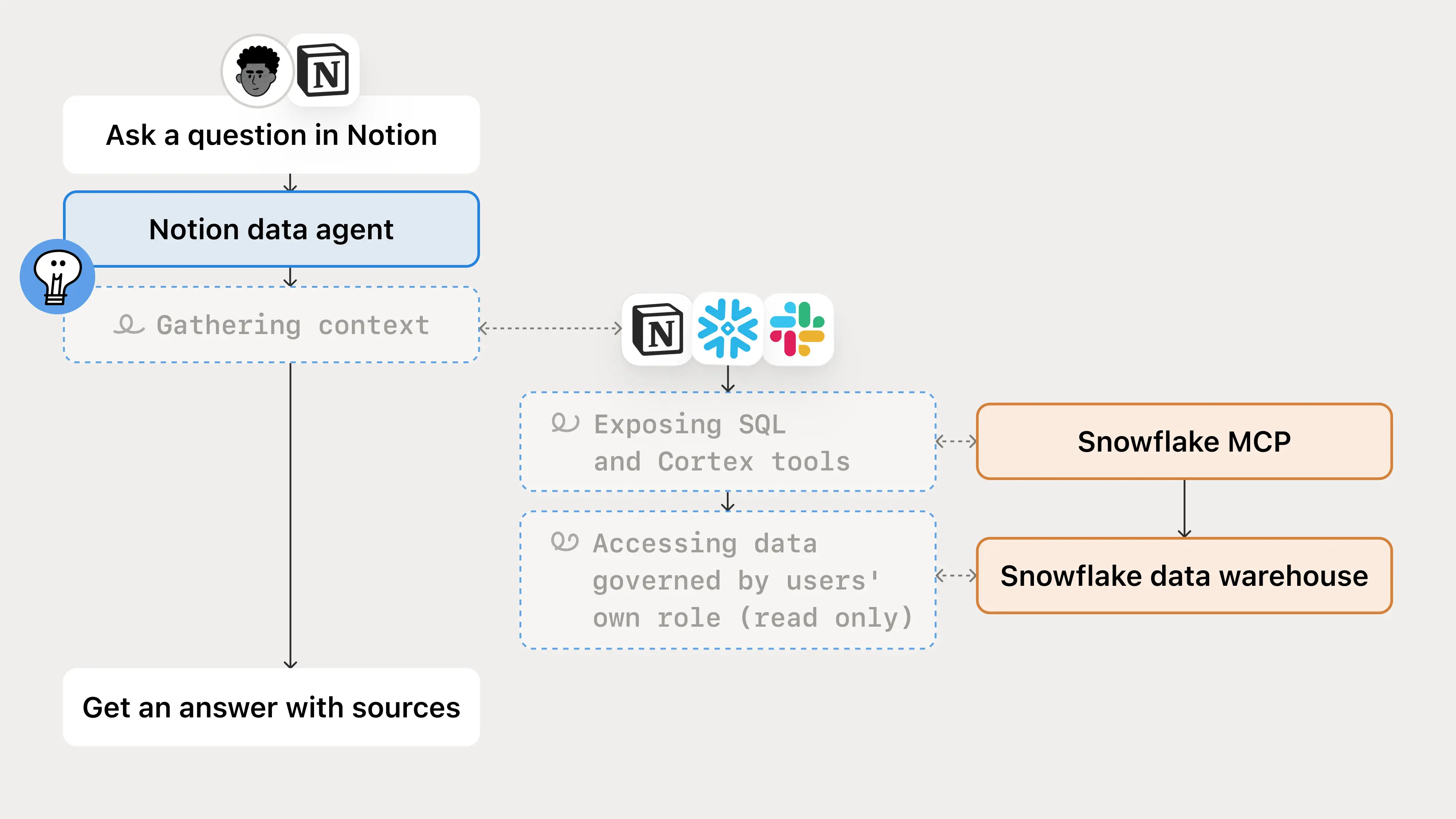
Data Scout Reporter uses saved report definitions to produce scheduled reports in Notion and Slack. Teams have also built specialised agents that connect to Data Scout over its shared MCP connection, reusing its data access and context while adding domain-specific guidance. Scheduled reporting requires its own approved access model.
The permission boundary follows the person
There are two permission systems here. Notion controls who can access the agent, its pages and its available tools. Snowflake controls what the authenticated person can query. Each employee signs in to the Snowflake MCP connection using their own Snowflake credentials, so the query executes under that identity and the relevant role and grants. Masking and row-level policies apply where configured.
If a query is denied under the person’s Snowflake identity, the agent should report the access limitation. A person may also be allowed to see a result that should not be pasted into a broad Slack channel or a widely shared report.
Find the definition before the table
An LLM with a warehouse connection can browse schemas and produce executable SQL without establishing whether workspace memberships are an acceptable proxy for people, which account mapping is authoritative, or whether a daily snapshot should be summed. Notion indexes Skills, Metric Definitions, Table Schemas, FAQs and known data changes in a Notion database for Data Scout to consult.
The row properties act as retrieval metadata: title, domain, type, description or keywords, and priority. The page body contains the procedure, calculation, caveats and links. A Skill can say how to investigate account adoption before a renewal; a Metric Definition specifies the numerator, denominator and exclusions; a Table Schema gives grain, relationships and join cautions. When a definition is maintained in another system, the page links to it instead of creating a second version.
The agent begins with one or two likely domains and relevant Skills. An exact high-priority entry can answer a point lookup. Otherwise it opens the selected pages, follows their references and expands its search only if guidance is missing. It does not load the entire library into every conversation or choose a table before deciding what the question means.
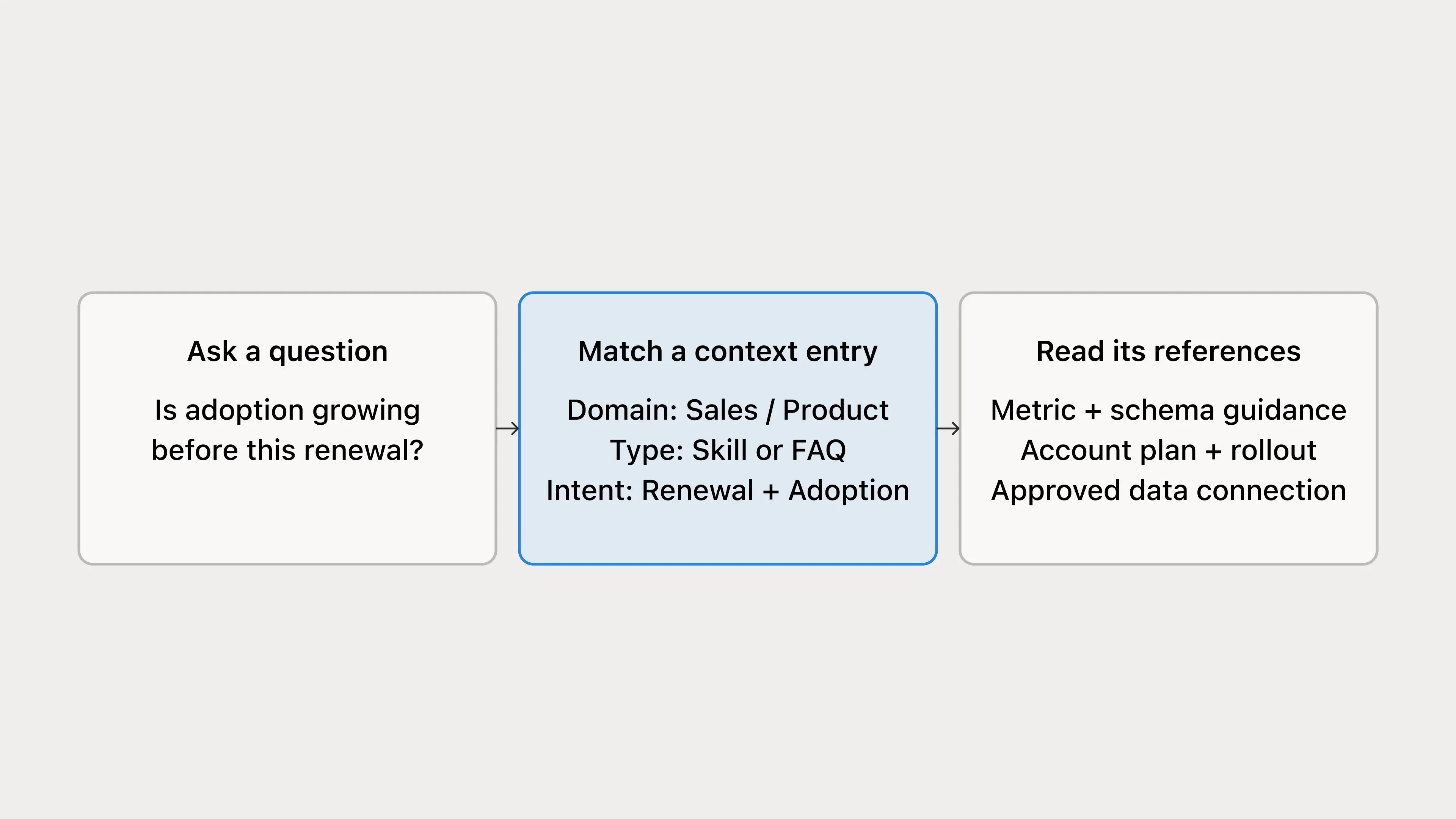
Notion tried putting all of the guidance into database properties for quicker retrieval. The metadata became overloaded and harder for people to maintain, so properties now locate a page; they do not substitute for reading its body. Priority is a retrieval hint, not proof that an entry is approved or current. Ownership, review status and freshness still need to be managed.
Data context determines the calculation: source, metric, grain, required filters and freshness. Business context helps explain a result through account plans, rollout notes, incidents or decisions. Routing guidance directs the agent to the appropriate connection and sources, potentially across more than one platform. Notion’s instructions keep business context from redefining the approved metric calculation.
The page library does not enforce metric definitions at query time or replace a semantic layer. Notion acknowledges that limitation and says teams can keep definitions in existing tooling, including Snowflake Semantic Views or Cortex Analyst while linking them to business context in Notion.
What happens between retrieval and an answer
Notion’s agent instructions require it to resolve the metric, account or population, period and comparison before calculating. Then it routes to the approved connection and source and checks the query logic and returned data for join cardinality, filters, denominators, incomplete periods, tracking changes and backfills.
For the renewal question, these checks catch different mistakes:
If one person belongs to several workspaces, joining account and workspace data may multiply that person’s activity. A syntactically valid
COUNTis still wrong for a people-based adoption metric.If the numerator and denominator use different populations or exclusion rules, the rate is meaningless even if both counts are individually correct.
If a daily snapshot has one row per entity per day, summing several days double-counts a current-state population. A single as-of date answers a current-state question; a date range belongs in an explicit trend.
If the latest period is incomplete or an event was renamed, the apparent change may reflect data collection rather than customer behaviour.
The discovery instructions also cover failure handling. When a necessary column is undocumented, inspect the schema. When Snowflake returns an invalid identifier, verify the actual schema rather than guessing another plausible column. When the loaded guidance already documents the fields, avoid an unnecessary wide schema retrieval. If a definition is missing, the query is denied, or a check fails, the agent should say what it cannot establish.
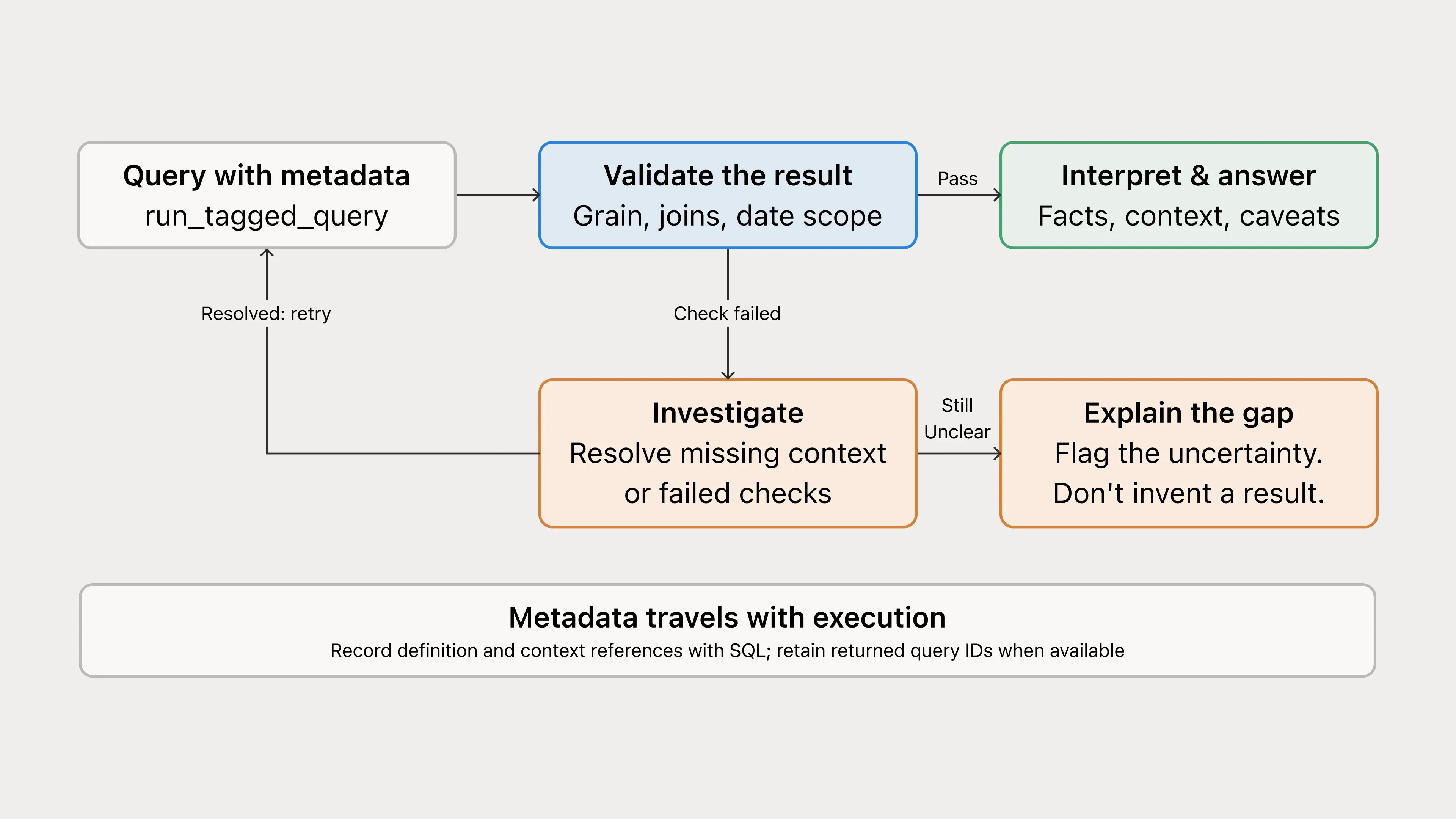
Only after checking the measurement does Data Scout use account notes to discuss whether the change fits the customer’s planned rollout. It should distinguish “usage increased under this definition” from “the rollout caused the increase”. The latter is an interpretation and the account team still owns the renewal decision.
An answer needs a trace
Suppose two people ask about the same account and receive different adoption figures. Their Snowflake roles might legitimately expose different data. Or the agent may have selected different account mappings, time windows or definitions. A transcript containing only the polished answer does not make that easy to diagnose.
Notion built an internal execution tool called run_tagged_query. It accepts SQL and metadata together, appends the metadata as a structured JSON comment in the SQL and calls the upstream Snowflake query tool. The metadata can identify a canonical metric, definition reference, context pages, filters, time window and question ID. The wrapper also emits execution telemetry. A question ID can tie several investigative queries to one question; an execution ID identifies a particular run when returned.
A JSON comment in the SQL text does not set Snowflake’s native QUERY_TAG session parameter. The comment can be a searchable marker if the execution tool preserves it. To populate QUERY_TAG, the execution layer must set the parameter on the session that runs the SQL. Separate tool calls need not share a session, and pooled sessions must clear or replace a previous tag. Otherwise query-history attribution can be wrong. Notion’s guide also notes that Snowflake’s AGENT_TYPE, when the connection is recognised as agentic, gives coarse classification rather than question-level lineage.
This wrapper is Notion’s internal tool, not something automatically installed with a Snowflake MCP connection. Merely mentioning its name in an agent prompt will not tag direct Snowflake calls.
If a trace shows the correct metric definition but the wrong table, the routing guidance needs attention. Duplicated people point to the procedure or join guidance. An unsupported explanation of a rollout points to interpretation. Notion says its wrapper is lenient by default: incomplete metadata does not block an otherwise valid query. A successful call can therefore still leave gaps in the trace.
Who updates the agent when the warehouse changes?
Schemas, event names, backfills and business plans move. Notion runs a nightly review agent across Data Scout conversations and queries, recently edited context pages, relevant Slack and Notion material, and GitHub changes. It records missing, stale or conflicting guidance with supporting evidence in a review database. A separate triage agent deduplicates findings, applies small, well-supported and authorised edits, and sends ambiguous or higher-risk ones to a person. A weekly Slack summary surfaces patterns and unresolved findings.
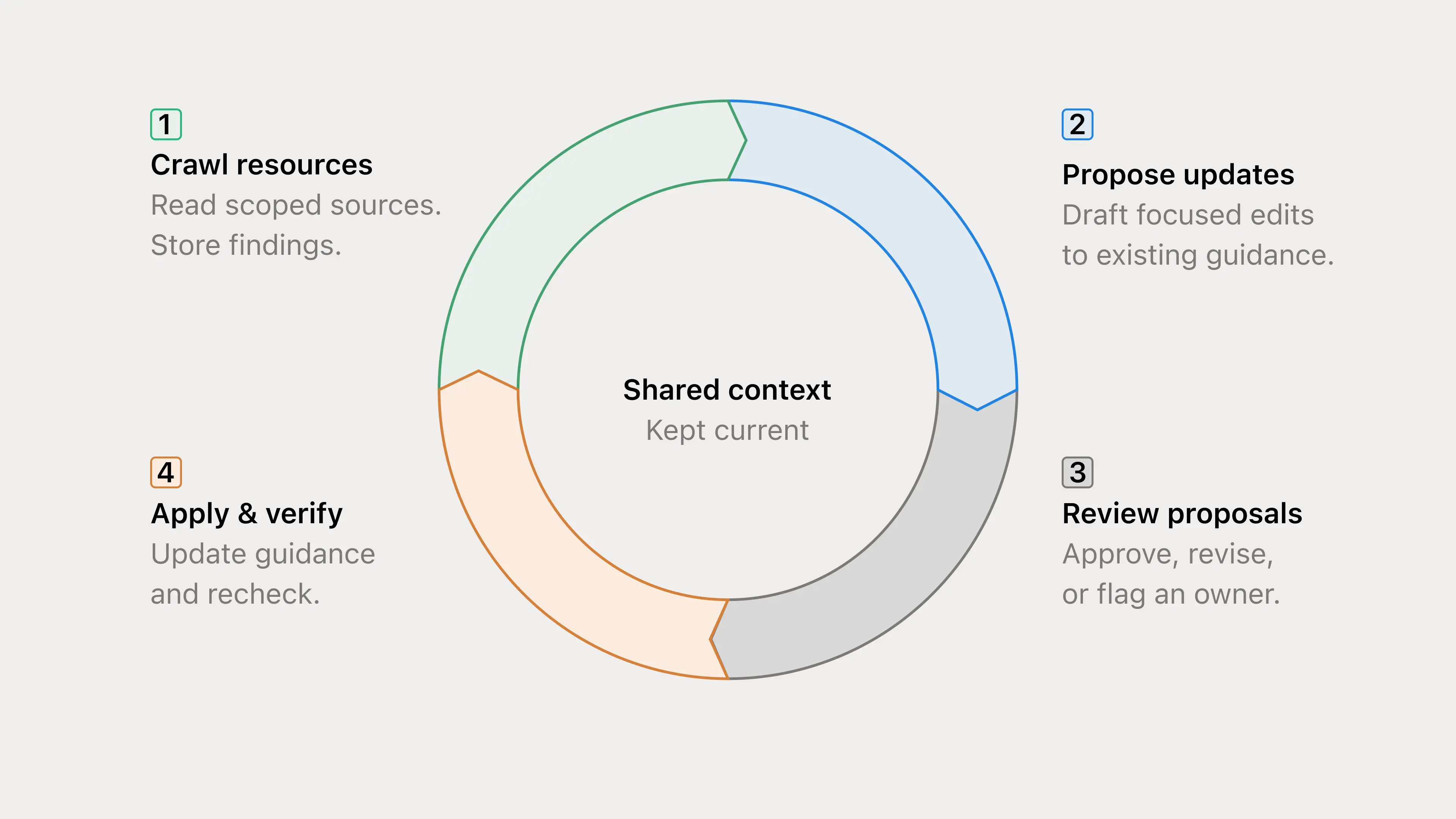
A correction in Slack gives the review process evidence to investigate; changing a metric still requires approval. A merged PR does not prove the change is deployed or historical data has been backfilled. Before editing, the triage process checks current guidance and preserves newer human changes; afterwards it verifies the saved update and rechecks affected questions. Metric meaning, source selection, grain, filters, access and sensitive-data handling remain owner-review decisions.
The maintenance agents review approved sources and update Notion pages. Scheduled runs do not inherit an employee’s Snowflake access. If query logs feed the review, they need a separately approved source.
The full scoop
To learn more about this, check Notion's Engineering Blog post on this topic
If you are already subscribed and enjoyed the article, please give it a like and/or share it others, really appreciate it 🙏
Keep learning
How Grab Reclaimed Hundreds of Data Engineering Hours With Multi-Agent AI

Grab’s analytics team supported 1,000+ monthly users across 15,000+ tables, but repetitive 'quick questions' were eating 40% of engineering time.
To fix it, the team built a multi-agent AI system that could answer data questions, trace lineage, inspect code, check pipeline health and draft common enhancement requests.
This piece breaks down how Grab moved data support from manual firefighting to agent-assisted workflows with specialist agents, SQL guardrails, human review and a feedback loop.
How Airtable Saved Millions by Cutting Archive Storage Costs by 100x

Airtable moved petabytes of archive data out of MySQL, made storage 100x cheaper and kept interactive query latency intact.
To get there, the team built a two-tier storage system that pushed old audit-log data into S3-backed Parquet files and queried them through an embedded Rust engine.
This piece breaks down how Airtable handled the migration, why it chose DataFusion and the optimizations that made cold storage feel fast.